Weather
- 4.4
- Rating
- 1.00M
- Installs
- Free
- Price
 Analysis by App-foxy
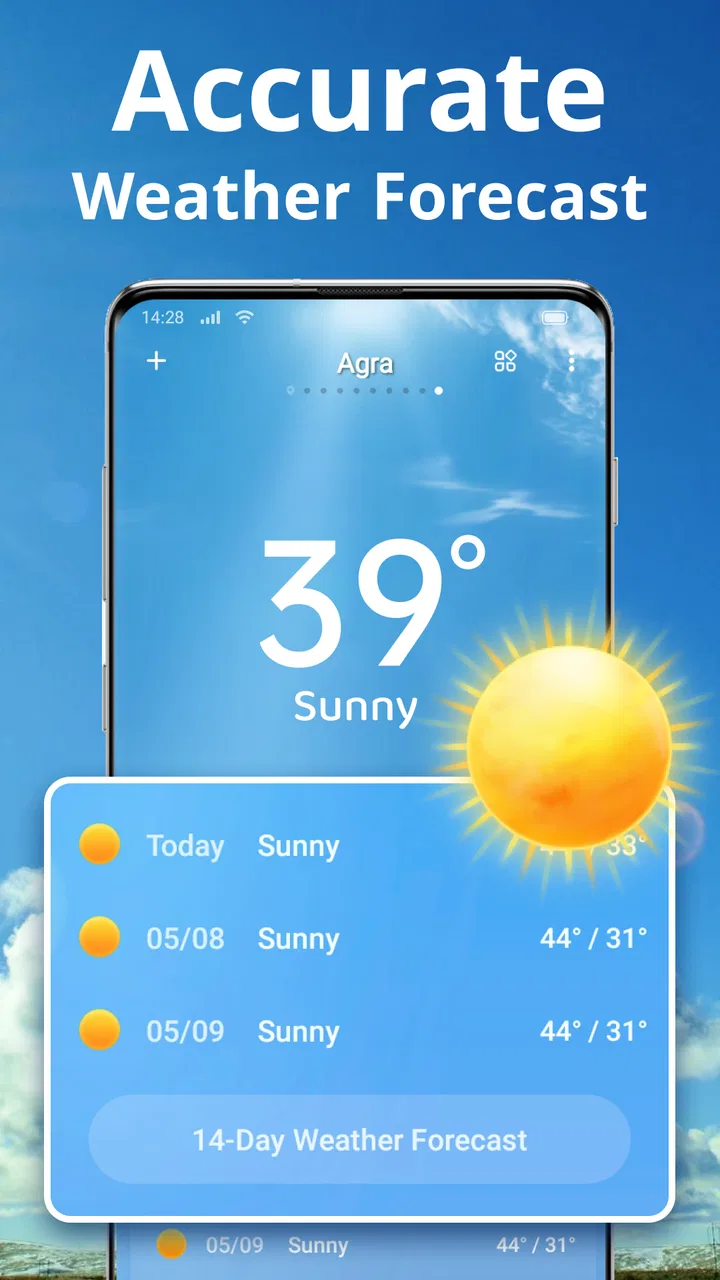
Weather apps are easy to underestimate. Most people open one for a quick temperature check, then leave, so the useful difference comes from how quickly the information makes sense when plans are already changing. After spending time with Local Weather Forecast, my view is that it works best as a practical daily companion rather than as a specialist meteorology tool. It brings forecasts, radar maps, widgets, and storm alerts into one place without making the basic experience feel complicated.
That balance is the main reason I would recommend it to a friend who wants more than the small weather panel built into a phone, but does not want to study dense charts. Coocent has made an app that feels approachable for ordinary routines: checking the morning commute, deciding whether to carry an umbrella, or watching a storm system before heading out. At the same time, the app has a few limitations that matter if you need highly detailed forecasting or prefer a completely stripped-back interface.
What using the app feels like day to day
The first useful quality is the way the information is grouped. A normal weather check usually begins with the current local conditions, then moves toward the next few hours or days. The app follows that natural order, so I do not feel forced to hunt through unrelated screens before finding the answer I need. That sounds basic, but it makes a difference when I am checking the forecast with one hand while getting ready to leave.
You May Also Like

 Blood Strike: 2.5 Anniversary
Blood Strike’s Loadouts Turn Every Drop Into a Tactical Gamble
A close look at Blood Strike’s custom loadouts: how fast access to signature weapons reshapes its battle royale rhythm, rewards preparation, and narrows the gap between fights.

 Pandora - Music & Podcasts
Pandora’s Music Is Easy to Start, but Harder to Recover
Pandora’s strength is its low-effort path from a seed to a station. Its weak spot is how much confidence it asks you to place in connection, setup, and quiet recovery.

 8 Ball Pool
 Is Built on Rivalries, Rematches, and Routine
A close look at the rivalries, rematches, shared routines, and unanswered safety questions that turn a quick pool match into a persistent mobile community.

 Samsung Music
’s Quiet Strength Is Playing What You Already Own
Its reach comes less from spectacle than from dependable access to a personal library. That simplicity is both the app’s strongest retention engine and its ceiling.

 AccuWeather: Weather Radar
AccuWeather Review: A Quick, Clear Forecast for Everyday Decisions
For everyday plans, the best forecast is the one you can understand quickly. AccuWeather makes rain timing, radar, and local conditions easy to act on, with a few trade-offs.

 Hill Climb Racing
Why Hill Climb Racing Still Turns Crashes Into One More Run
A tiny car, a bumpy hill and one more upgrade: Hill Climb Racing keeps resurfacing because its simple chaos makes every near-miss feel personal.
More From Our News Desk



The local forecast is the center of the experience. I found it most useful when I treated it as a planning aid instead of a promise. A forecast can tell me whether rain is likely and whether conditions are changing, but it cannot remove the uncertainty that comes with fast-moving weather. The app is at its best when I check the trend, compare it with the radar, and then make a sensible decision rather than relying on one isolated symbol.
The radar maps add a more visual layer to that process. A simple forecast icon may say that rain is possible, while a map can help me understand whether the rain is approaching, passing nearby, or spreading across the area. That distinction is valuable for short trips. If I am deciding whether to walk to a shop now or wait, seeing the movement of a weather system can be more useful than reading a general daily forecast.
I also like the fact that the radar is not treated as a separate specialist feature with no connection to everyday use. It supports the question most people actually have: “What is likely to happen around me soon?” I would not use it as a replacement for official emergency information during a serious event, but it gives ordinary users a clearer picture than a static forecast card.
The widget is another practical part of the design. I prefer weather information that is visible before I open an app, especially on busy mornings. A widget can reduce the number of steps between waking up and knowing whether I need a jacket, and it is useful for people who do not want weather notifications constantly interrupting them. The trade-off is that a widget is only helpful if it remains readable on your particular home screen, so its value depends partly on how much space you are willing to give it.
My favorite routine with this app is to keep the widget for quick checks and open the full app only when the conditions look uncertain. For example, before leaving for work, I can glance at the current forecast, then open the radar if rain appears likely during the journey home. This two-step workflow is more efficient than opening a detailed weather service every time, while still giving me additional context when I need it.
A useful approach to storm alerts
Storm alerts are potentially the most important feature, but they also require the most sensible expectations. Alerts are helpful because they can draw attention to changing conditions when I am not actively checking the app. That makes them especially useful for people who work outdoors, travel through areas with unpredictable weather, or simply want an extra warning before a severe system arrives.
Still, I would not treat an alert from any weather app as the only source of safety information. When conditions become genuinely dangerous, local authorities and official emergency channels should take priority. The app can serve as an early prompt to pay attention, check the radar, and look for more authoritative guidance. That is a strength, but it is also a responsibility for the user: notifications should support good decisions, not replace them.
One small but important habit is to avoid turning every possible alert into background noise. If notifications become too frequent or too broad for your location, you may start ignoring them. I recommend reviewing which alerts are actually useful to your routine and keeping the app as a prompt for action rather than a constant stream of weather commentary. This makes the feature more meaningful when something important does appear.
Where the app earns its place beside built-in weather tools
The weather panel already included with a phone is often enough for a quick temperature check. That is the main alternative here, and it has an obvious advantage: it is already integrated into the device. If all you want is a glance at today’s conditions, installing another app may not feel necessary.
Local Weather Forecast becomes more convincing when you want several views in one experience. The combination of local conditions, radar maps, a widget, and storm alerts gives it a broader role than a basic temperature card. I find that combination particularly helpful when the weather is unsettled. On a calm day, the built-in option may be faster; on a day with changing rain or storms, this app gives me more reasons to open it.
It also sits in a comfortable middle ground compared with highly technical weather services. Specialist apps can be better for users who want extensive charts, layers, historical context, or professional-style forecasting detail. I would choose those alternatives for outdoor work that depends on precise weather interpretation or for serious hobbyists who enjoy examining atmospheric information. Coocent’s app is easier to approach, but that simplicity means it should not be judged as a full professional forecasting workstation.
The app is free to install, which makes trying this middle-ground approach straightforward. It also includes optional in-app purchases ranging from ninety-nine cents to fifty-nine dollars and ninety-nine cents per item. I would advise checking what each optional purchase changes before spending money, especially if the free experience already covers your needs. For a casual user, the important question is not whether additional options exist, but whether they solve a problem you actually have.
Three practical ways to get more from it
First, I would use the app in layers instead of opening every feature at once. Start with the widget or local forecast, then move to the radar only when the conditions are uncertain. This avoids turning a simple morning check into a long browsing session. It also helps separate information that is immediately useful from information that is merely interesting.
Second, compare the radar with your actual route rather than looking at it abstractly. A rain band that appears close on a map may affect one side of a journey more than another. If I am walking, cycling, or making several short stops, the map can help me choose whether to leave now, take a different route, or wait. The insight is not that the radar predicts every minute perfectly; it is that it helps me make a better short-term choice than a single daily icon would.
Third, use the app before an event, not only during a problem. If I have an outdoor appointment, I can check the forecast earlier, look again as the time approaches, and use the alert function as a backup. That workflow is more reliable than checking once and assuming the conditions will remain unchanged. It also prevents the common mistake of treating a morning forecast as a guarantee for the entire day.
A fourth useful habit is to keep the widget focused on the location that matters most. People who travel between home, work, and another regular place may be tempted to check several locations constantly. That can make the home screen feel crowded and dilute the value of the first glance. I prefer keeping one primary location visible and opening the app when I need a more deliberate comparison.
The friction I noticed during regular use
The biggest weakness is not that the app lacks useful weather tools; it is that the experience can feel like more than some people need. If your only question is whether it is warm outside, a dedicated weather app may be unnecessary. The radar and alerts are valuable when conditions are changing, but they add visual and notification complexity that a minimalist user may find distracting.
There is also a difference between seeing more information and understanding it better. Radar maps can look reassuringly precise, yet weather movement is still difficult to interpret if you are unfamiliar with map colors and patterns. I would not recommend relying on the map alone for an important journey. Use it as context alongside the forecast and common sense, particularly when driving or making decisions in severe weather.
Notifications need the same careful handling. Alerts are useful when they help me notice a meaningful change, but they become a drawback if I allow every possible warning to compete for attention. This is not a reason to dismiss the feature; it is a reason to set up the app around my actual needs. A person living in an area with frequent weather changes may appreciate the reminders more than someone who wants an almost silent utility.
The optional purchase structure is another point to consider. The app is free, but the range of purchase prices means users should be deliberate before upgrading anything. I prefer weather apps that make the value of paid options immediately clear. If you are comfortable using the free tools and do not need extras, there is no reason to pay simply because the option is visible.
Device compatibility is reasonably broad for Android users because the app supports Android 7.0 and later. That makes it accessible to people who keep an older phone for longer than the usual upgrade cycle. The current version is 1.7.1, so anyone installing it should still make sure the app behaves well on their particular device, especially if the phone uses an older interface or has limited screen space for a widget.
Who will appreciate it most
I think this app is a strong fit for someone who wants a clear local forecast but also values visual confirmation when rain or storms are approaching. It suits commuters, parents planning outdoor activities, travelers checking conditions before leaving, and anyone who likes having weather information visible on the home screen. It is also a sensible choice for a user who finds professional weather apps intimidating but has outgrown a single basic forecast card.
The age rating is Everyone, which matches the straightforward nature of the app. There is no learning barrier that would prevent a typical household from using it. A family member who only wants a quick forecast can use the main screen, while someone more curious about an approaching rain system can open the radar. That range is one of the app’s better qualities.
I would be more cautious about recommending it to professional users, serious weather enthusiasts, or anyone who requires highly specialized forecasting tools. The app’s appeal is its practical balance, not deep technical analysis. If your work depends on precise wind, visibility, precipitation, or long-range planning details, you should compare it with a service designed specifically for that purpose rather than assuming a general local forecast is enough.
I would also skip it if you strongly prefer zero notifications and the smallest possible app footprint. The built-in weather feature on your phone may be a better match for that style. Similarly, if you already use a trusted weather service with a radar, widget, and alert system that you understand well, switching may not bring enough benefit to justify changing your routine.
What the adoption numbers suggest, and what they do not
The app has reached over one million installs and holds a 4.5 average from around eight thousand ratings. Those figures suggest that the basic combination of local weather information and extra monitoring tools works for a substantial audience. I see them as a useful sign of familiarity, not as proof that the app will suit every person or every location.
It has been available since November 29, 2021, and the developer is Coocent. That history gives the app a more established feel than a brand-new weather utility, while the current version indicates that it continues to be maintained as a living product. I still judge it by how well it fits my routine: adoption can encourage a trial, but daily usefulness is what keeps a weather app installed.
One reason it feels approachable is that the app does not force me to choose between a quick answer and a more visual view. I can keep my interaction short on ordinary days and use the radar or alerts when conditions deserve attention. That flexibility is more valuable than a long list of features because it lets the app adapt to the situation instead of making every forecast check feel equally involved.
My final recommendation
After using it as a regular weather companion, I see Local Weather Forecast as a well-judged option for people who want a little more awareness than their phone’s default weather panel provides. Its strongest case is the combination of an accessible local forecast with radar maps, a home-screen widget, and storm alerts. Together, those tools support real decisions: whether to leave now, whether to carry rain gear, and whether changing conditions deserve a closer look.
Its limitations are equally clear. It is not the right choice for users who want a purely minimal display, and it should not be treated as a professional forecasting system or a substitute for official emergency guidance. The optional in-app purchases also deserve a careful look before spending, since the free starting point may already be enough for casual use.
My verdict is simple: choose it if you want practical weather awareness without a technical learning curve. I would recommend installing it for a week, placing the widget where you naturally look, and testing the radar on a few changing-weather days. If that workflow helps you plan more confidently, the app has earned its place. If you only ever need a temperature glance, the built-in alternative will probably remain the cleaner solution.
FAQs for Weather
01What features does the Weather app offer?
The Weather app provides real-time weather updates, weekly forecasts, radar maps, and severe weather alerts. It also includes features like sunrise and sunset times, humidity levels, and wind speeds. Some versions offer lifestyle forecasts, which suggest the best times for activities like jogging or gardening based on weather conditions.
02How accurate is the Weather app's data?
The Weather app sources its data from trusted meteorological organizations and uses advanced algorithms to ensure high accuracy. However, like any weather forecasting tool, predictions can vary due to sudden changes in weather patterns. Users typically find short-term forecasts more reliable than long-term predictions.
03Is the Weather app free to use?
The basic version of the Weather app is free and provides essential features such as current conditions and basic forecasts. However, some advanced features, like detailed radar maps and ad-free experiences, may require an in-app purchase or subscription. It's advisable to check the app store listing for specific pricing details.
04Does the Weather app work offline?
The Weather app requires an internet connection to provide the most accurate and updated weather information. While some cached data might be available offline, real-time updates and interactive features like radar maps will need a connection to function properly. It’s best to download needed information before going offline.
05Can I customize the notifications in the Weather app?
Yes, the Weather app allows users to customize notifications. You can set alerts for severe weather warnings, daily forecasts, and significant temperature changes. Customization options might vary between the free and premium versions, so users should explore the settings to tailor alerts to their preferences.
Pros
- Accurate forecasts with real-time updates.
- User-friendly interface for easy navigation.
- Customizable notifications for severe weather.
- Detailed hourly and weekly forecasts.
- Interactive radar maps for tracking storms.
Cons
- Ads can be intrusive and frequent.
- Some features require in-app purchases.
- Occasional delays in weather updates.
- Limited offline functionality.
- Battery consumption can be high.

Weather
Gallery